New Feature: Restrict Sample Order Shipping Destinations
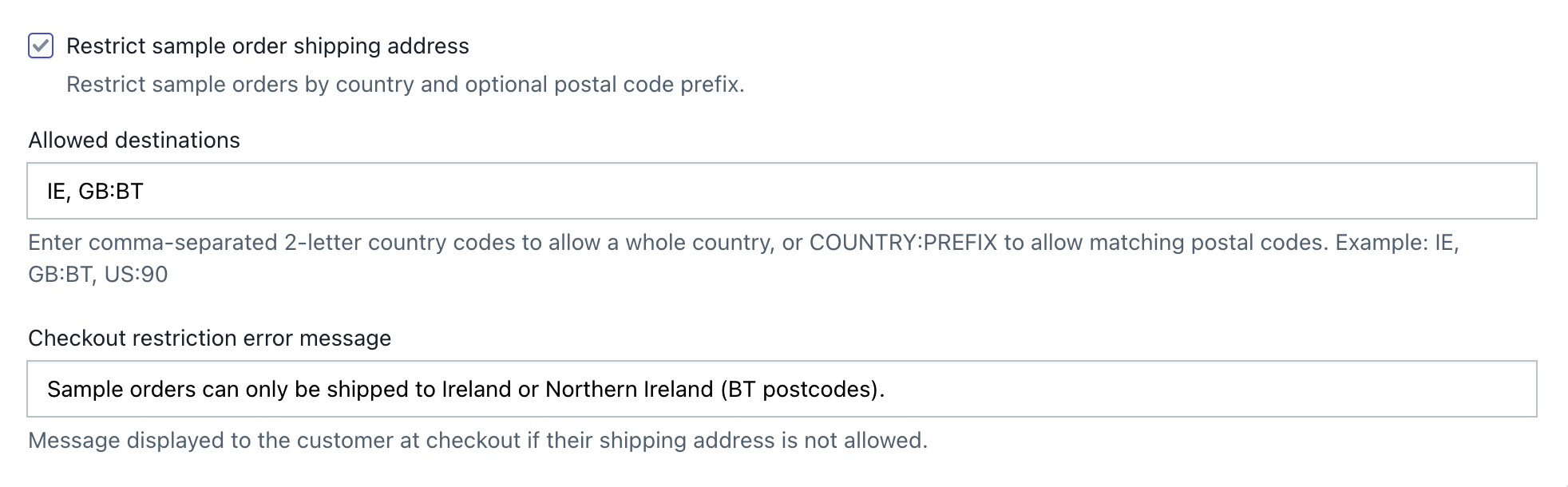
We are excited to introduce a new shipping control in Product Samples: Sample Order Shipping Address Restrictions.
This feature lets you control where sample orders can be shipped by using country codes and optional postal or ZIP code prefixes. It is useful when your sample delivery area is more limited than the delivery area for your regular products.
Why Use Shipping Address Restrictions?
Shopify shipping zones normally control the destinations available during checkout. However, sample orders can have more specific requirements, especially when they are created through a draft-order workflow.
With this feature, you can:
- Limit samples by country: Allow sample orders only in selected countries.
- Limit samples by region: Use postal or ZIP code prefixes to allow only part of a country.
- Protect fulfillment costs: Prevent sample orders from being sent outside your supported delivery area.
- Keep regular orders unchanged: The restriction applies to sample orders and does not change shipping rules for normal orders.
- Show a custom checkout message: Explain why an entered shipping address is unavailable.
Configuration Format
Enter destinations as a comma-separated list using one of these formats:
Allow an Entire Country
Use a two-letter country code: IE
This allows every valid shipping address in Ireland.
Allow Only Postal or ZIP Code Prefixes
Use COUNTRY:PREFIX: GB:BT
This allows addresses with country code GB only when the postcode begins with BT.
Combine Multiple Rules
Separate rules with commas: IE, GB:BT, US:90
This configuration allows:
- All addresses in Ireland.
BTpostcodes in the United Kingdom.- ZIP codes beginning with
90in the United States.
Country codes and postal prefixes are not case-sensitive. Spaces inside postal codes are ignored during prefix matching.
Important: A country-only rule is broader than a postal-prefix rule. For example,
GB, GB:BTallows all addresses in the United Kingdom becauseGBpermits the entire country.
Example: Ireland and Northern Ireland Only
To allow sample delivery throughout Ireland and only to Northern Ireland within the United Kingdom, use: IE, GB:BT
Recommended checkout message: Sample orders can only be shipped to Ireland or Northern Ireland (BT postcodes).
Expected results:
| Shipping destination | Example postcode | Result |
|---|---|---|
| Ireland | D02 X285 |
Allowed |
| Northern Ireland | BT7 1NN |
Allowed |
| England | SW1A 1AA |
Blocked |
| France | 75001 |
Blocked |
Do not enter IE, BT for this setup. BT by itself is the official country code for Bhutan. Northern Ireland must be configured as GB:BT.
How to Enable the Checkout Validation Rule
The Product Samples checkout validation rule must be activated once in Shopify before address restrictions can run.
- In Shopify Admin, go to Settings > Checkout.
- Find the Checkout rules section.
- Click Add rule.
- Select the Product Samples validation rule, shown as Product Samples Validation or Cart Checkout Validation.
- Activate and save the rule.
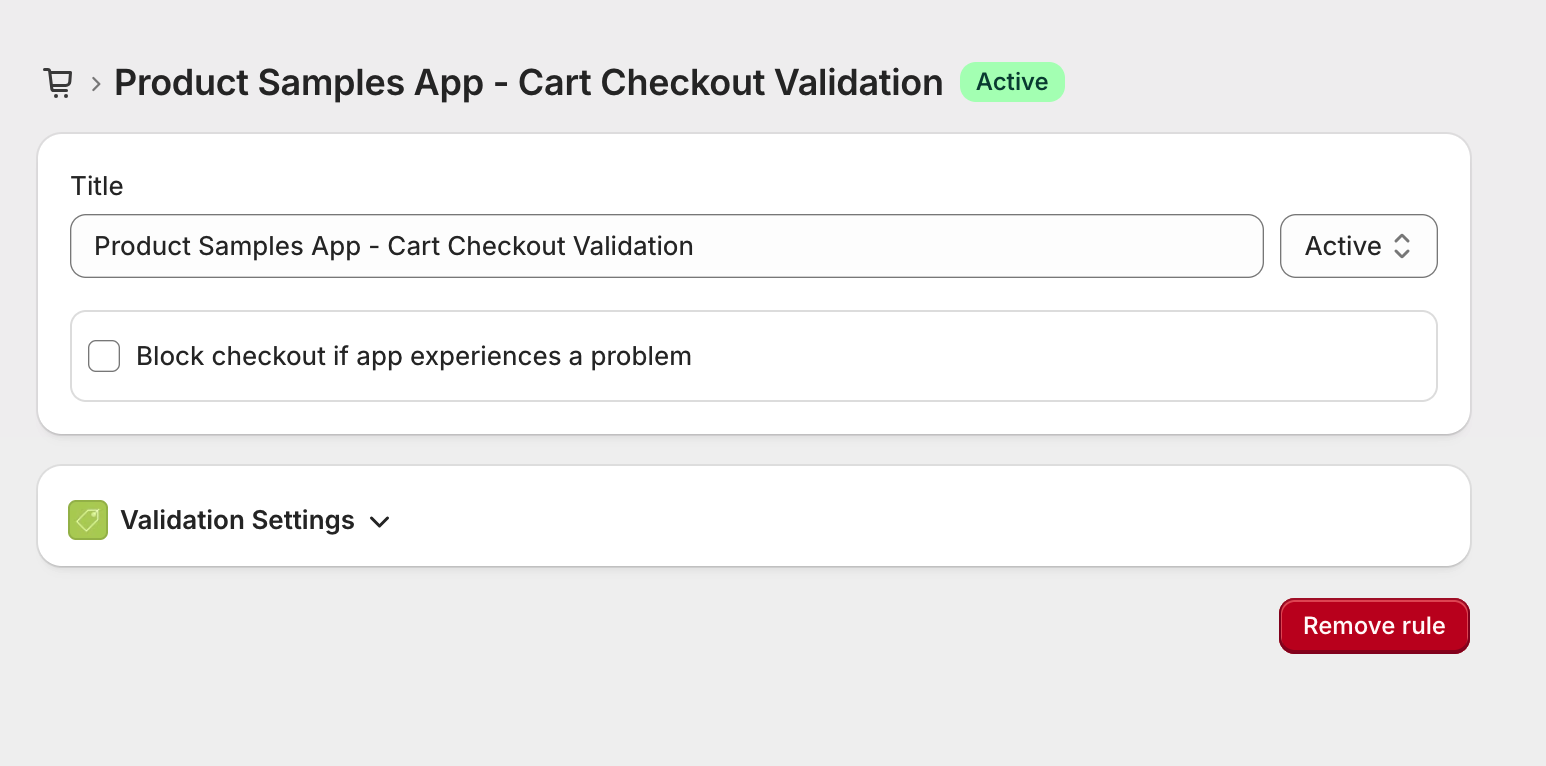
If the rule is already active, you do not need to add it again.
How to Configure Shipping Destinations
- In Shopify Admin, open Product Samples.
- Go to Settings.
- Scroll to the Shipping rate section.
- Enable Restrict sample order shipping address.
- In Allowed destinations, enter your country and postal-prefix rules.
- In Checkout restriction error message, enter the message customers should see when their address is not supported.
- Click Save settings at the bottom of the page.
For Ireland and Northern Ireland, enter: IE, GB:BT
More Configuration Examples
Canada Only
CA
Selected Canadian Postal Areas
CA:H, CA:M
This allows Canadian postal codes beginning with H or M.
United States and Selected UK Areas
US, GB:BT, GB:JEThis allows all US addresses plus UK postcodes beginning with BT or JE.
Multiple ZIP Code Regions in One Country
US:90, US:91, US:92This allows US ZIP codes beginning with 90, 91, or 92.
Frequently Asked Questions
Which country-code format should I use?
Use the two-letter country code used by Shopify, such as IE, GB, US, CA, or FR.
Can I configure more than one postal prefix for a country?
Yes. Add a separate COUNTRY:PREFIX rule for each prefix. For example:
US:90, US:91, US:92
Are country codes and postal codes case-sensitive?
No. The app converts configured values and checkout addresses to uppercase before comparing them.
Do spaces in postal codes matter?
No. Spaces are removed before prefix matching. For example, BT7 1NN matches the GB:BT rule.
What happens if I enable the feature without any allowed destinations?
No destination will match, so sample orders with a shipping address will be blocked. Add at least one valid country or postal-prefix rule before saving and testing the feature.
Does this validate the complete postal-code format for every country?
Shopify validates the shipping address and postal-code format. Product Samples applies the country and configured prefix restrictions after normalizing case and spaces.
Does this affect regular product orders?
No. The rule is intended for sample orders created by Product Samples. Regular orders are not restricted by this setting.
Does this apply to draft orders?
The restriction runs when the buyer goes through checkout, including the checkout used to complete an app-created sample draft order. A draft order completed directly by staff in Shopify Admin might not pass through customer checkout validation.
How should I test the rule?
After saving the configuration:
- Create a sample order through Product Samples.
- Test one address that should be allowed.
- Test one address in the same country with a non-matching postal prefix.
- Test an address in a country that is not configured.
- Confirm the blocked addresses display your custom checkout message.
Need Help?
If the validation rule is active but unsupported addresses are not blocked, confirm that:
- Restrict sample order shipping address is enabled.
- The configuration uses
COUNTRY:PREFIX, not a standalone postal prefix. - The Shopify checkout validation rule is active.
- The order was created through Product Samples and is being completed through checkout.
Contact our support team at [email protected] if you need help reviewing your configuration.
Was this article helpful?
Help us improve our documentation
Still need help?
Can't find what you're looking for? Our support team is here to help.
Contact SupportRelated Help Articles
Show Fabric Details in a Quick View Pop-up on Your Samples Page
Let shoppers preview product images, descriptions, fabric specifications, and add a sample without leaving the…
Customizing Sample Templates
You can easily update the text and markup shown in your sample widgets directly from…
How to Translate the App Interface
App’s text be translated from app’s Settings 1. From your app’s main dashboard 2. Navigate…