Getting Started Updated June 15, 2025

How to Load the App Faster

1 min read
354 views
Helpful (0)

This doc will show you how to improve app loading speeds!

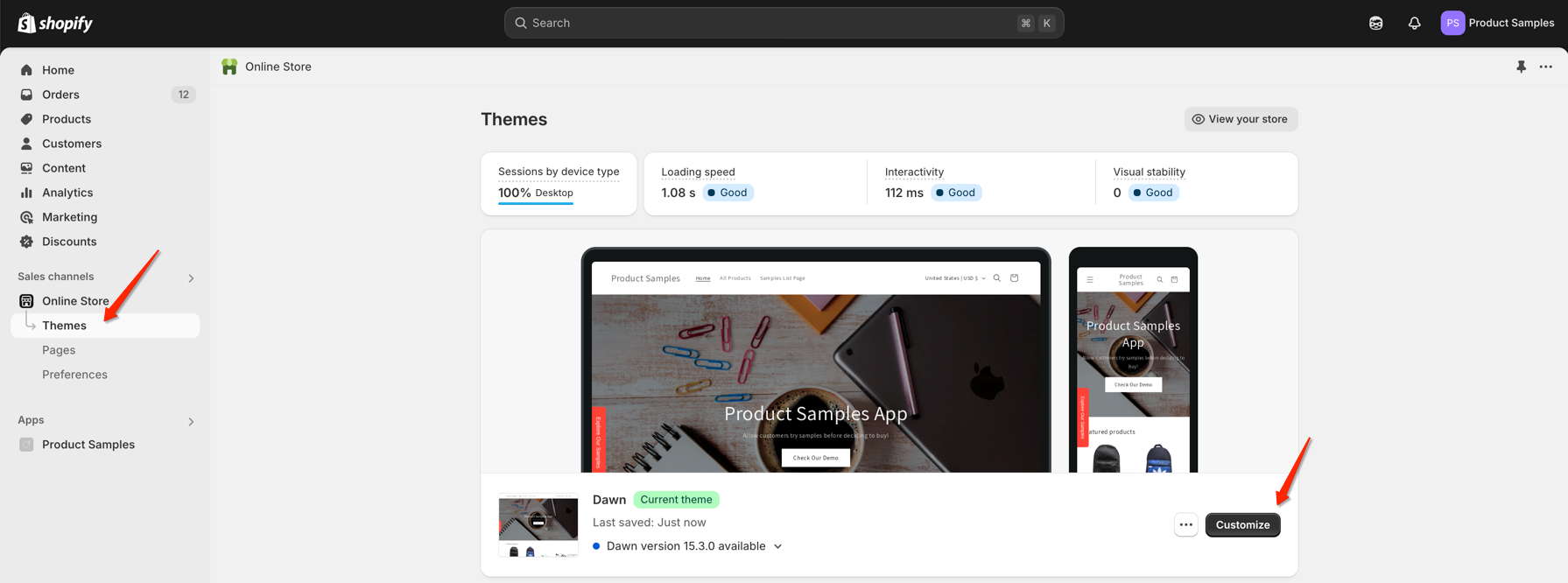
1. From your Shopify admin, go to Online Store > Themes.

2. Select a theme in which you want to edit.

3. Click Actions > Edit Customize Edit Live Theme
From the left sidebar, navigate to App embeds > Enable it

Was this article helpful?

Help us improve our documentation

Still need help?

Can't find what you're looking for? Our support team is here to help.

Contact Support

Related Help Articles

Configuration

How to Hide the Product Samples Widget on Specific Shopify Pages

Note:You’ll need some familiarity with CSS and Shopify Liquid for these instructions. If you’re not…

Read Article β†’ 2 min read
Help Article

How to Set Different Shipping Prices for Your Product Samples by Country

Are you sending product samples to customers in different countries? You probably know that shipping…

Read Article β†’ 5 min read
Configuration

Controlling App Visibility

You can control where the app appears – or limit it to specific themes. How…

Read Article β†’ 1 min read